Executive Support • Operations • Systems • Automation

Support that thinks
beyond the task.

I build the structure behind the work: clearer ownership, visible priorities, thoughtful executive support, documented processes and workflows that reduce unnecessary manual handoffs.

Explore the work →
Project tracking result
40%

Improvement in on-time project completion
through clearer ownership, deadlines and visibility.

Operating loop

CAPTURE → CLARIFY → ASSIGN → EXECUTE → CLOSE

01 • Systems & automation

The tools are the canvas. The thinking is the skill.

The portfolio recreates the architecture and decision-making behind systems I have built, without exposing previous employers' proprietary work.

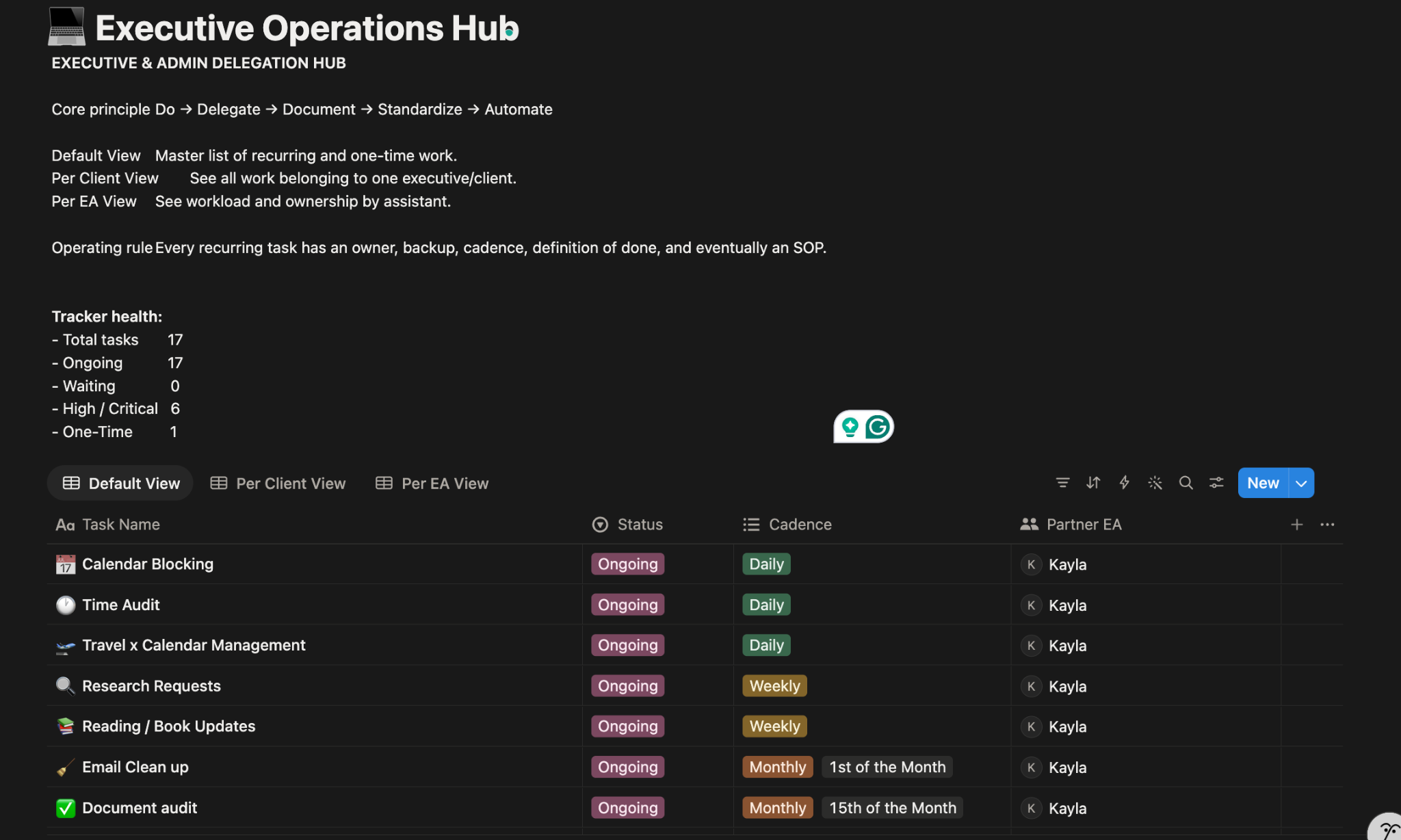
01 • Notion delegation system

Executive Command Center

A recreated demonstration based on a Notion task-management system built using the Sam Corcos delegation approach. Ownership, priority and next actions become visible instead of living in memory or scattered messages.

EXECUTIVE COMMAND CENTERTODAY
25Tasks
8Waiting
12Active
5Due Today
TaskOwnerPriorityDueStatus
Review proposalVivianHIGHTodayWAITING
Board materialsVivianHIGHFriPREPARING
Vendor approvalOpsMEDThuIN PROGRESS
Client follow-upSalesLOWFriASSIGNED
DELEGATION FLOW
CAPTUREGet work out of memory.
CLARIFYDefine the outcome.
DELEGATEAssign ownership.
TRACKMake progress visible.
REVIEWSurface blockers.
CLOSEConfirm the result.
02 • Google Forms + Zapier + Monday.com

From intake to execution.

When a potential client submitted a form, the automation could route the request to the right workspace, create the work item, assign an owner and start the appropriate process.

WORKFLOW ARCHITECTUREROUTING
FORMApplication submitted.
ZAPIERTrigger fires.
ROUTECorrect workspace + process.
MONDAYItem populated.
OWNERAssigned automatically.
PROCESSVerification → completion.
ROUTING CAN BRANCH
WORKSPACE A
WORKSPACE B
WORKSPACE C
Why this matters: there were several workspaces and different forms, so the workflow had to start the right process, in the right place, with the right person assigned.
03 • Client onboarding

Inside the workflow.

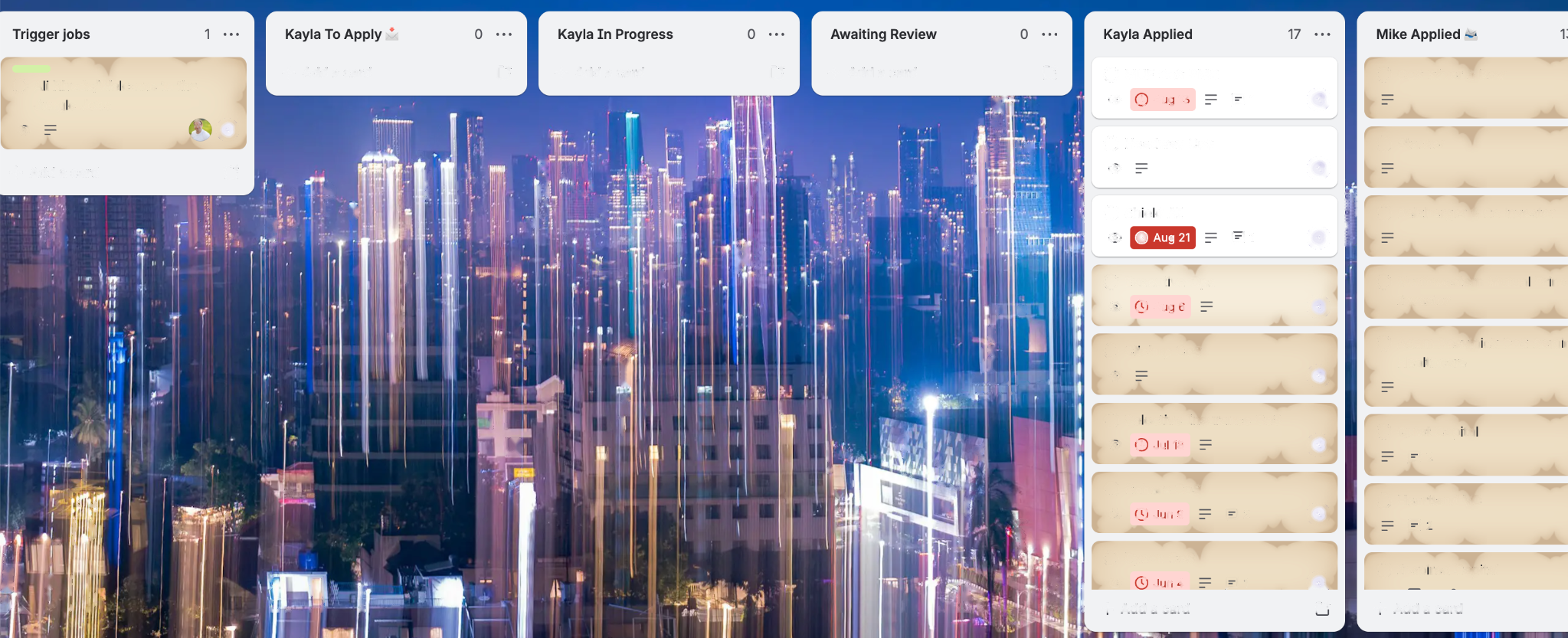
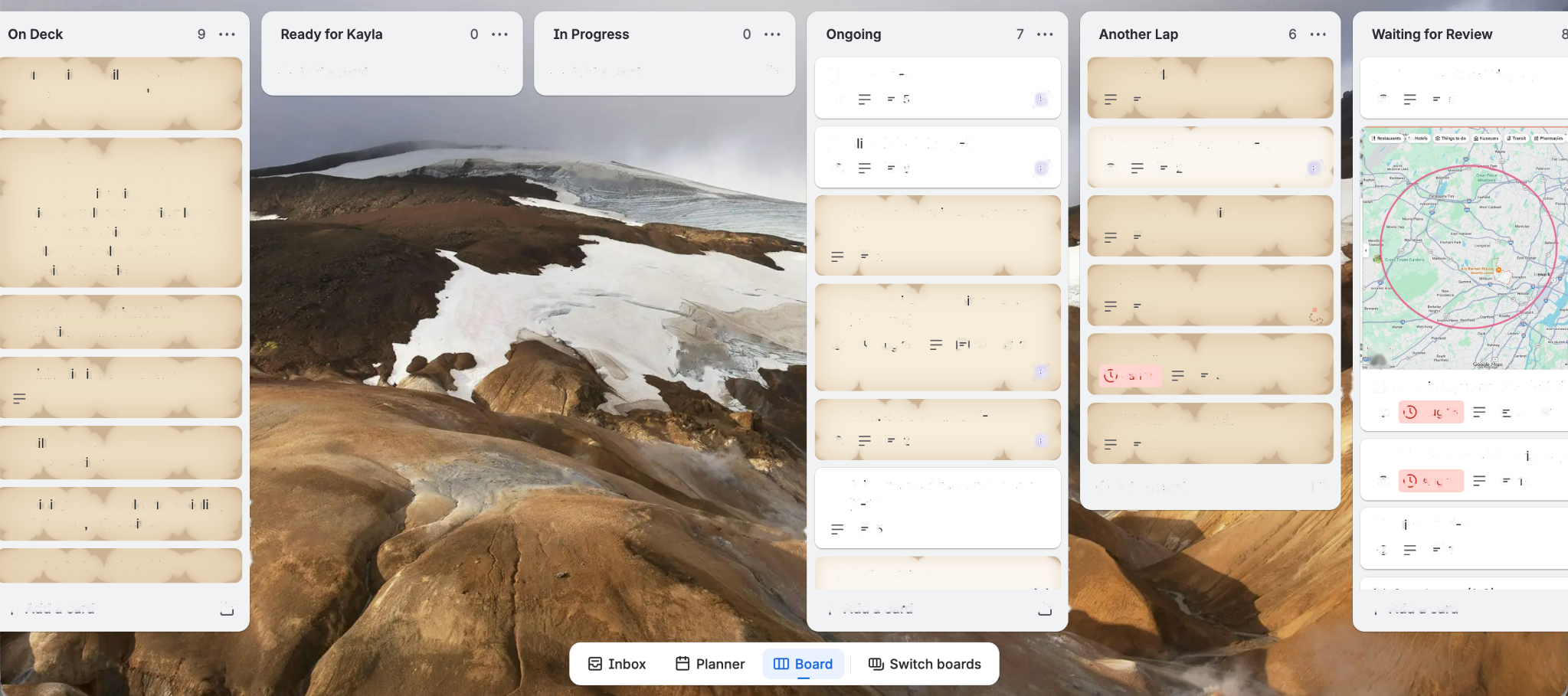
A fictionalized Monday.com-style board showing how automated client intake can become visible operational work.

New1
Acme ConsultingApplication received
AUTO-CREATED
Verify1
BrightPath Ltd.Docs review
ASSIGNED
In Progress1
Summit PartnersOnboarding
OWNER: OPS
Waiting1
Verte SolutionsAwaiting info
FOLLOW-UP
Complete1
North GroupCompleted
CLOSED
04 • Project handover

Make the transfer clean.

A structured handover moves context from the outgoing owner to the next owner without relying on a long chain of messages.

OUTGOING OWNER
Context • files • open work • decisions
HANDOVER PACK
Dependencies • deadlines • next actions • risks
NEW OWNER
Briefed • assigned • ready to continue
Calendar Management

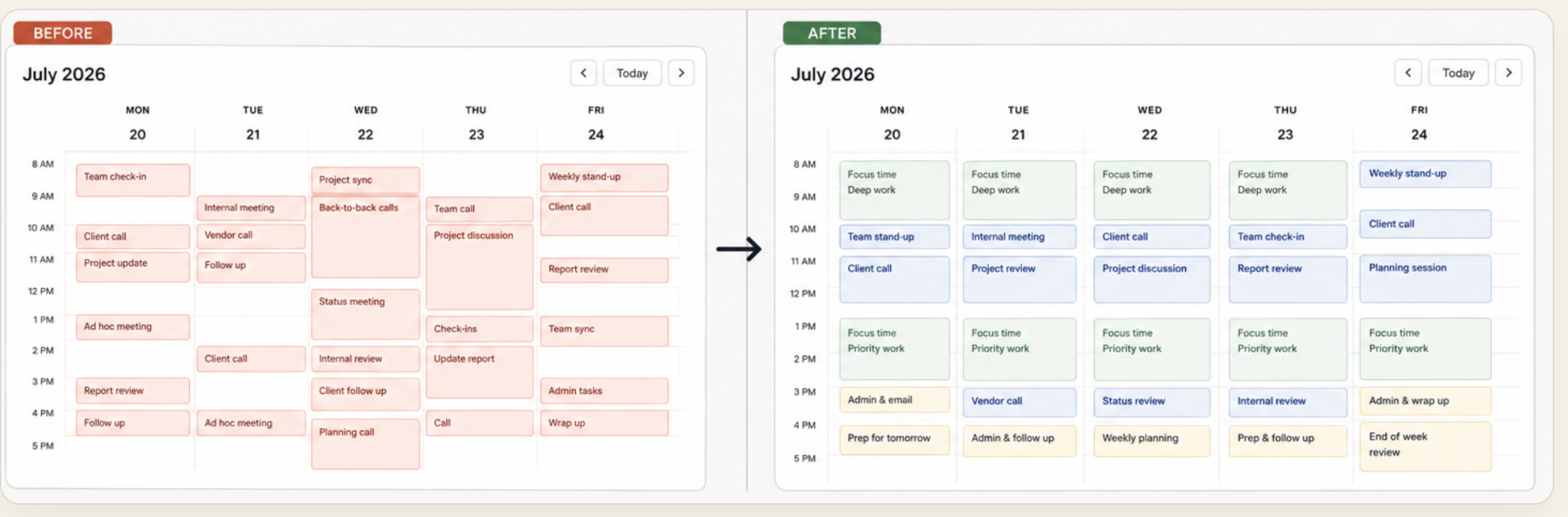
Turning a busy calendar into a structured week.

Priorities, meetings, preparation and focus time, organized intentionally.

Before-and-after calendar management case study showing a busy calendar reorganized into a structured week.
MY APPROACH

Start with the clutter.

The first step was to look at the calendar as a whole rather than treating each meeting as a separate item. I wanted to see where time was being fragmented, where meetings were competing with each other, and where important work had no room around it.

Then create structure.

I grouped related commitments, reduced unnecessary switching, created space for preparation and follow-up, and protected blocks for focused work. The goal was not to make the calendar look empty. It was to make the available time work more intentionally.

03 • Digital workspace organization

Organizing digital workspaces so information is easier to find and use.

A browser can become a second desk: dozens of tabs, half-finished research, work tools, reference pages and “I'll come back to this” links. I like turning that clutter into a workspace that makes sense at a glance.

Tracking
AI
Drive
Docs
Socials
Education
Remote work
workspace / organized tabs
Organized Browser WorkspaceFictionalized demonstration

Tracking & Work

Research & AI

Documents

Communication

Learning

Reference / Later

The problemImportant pages get buried in a wall of open tabs. The result is visual noise, repeated searching and a higher mental load.
The resultTabs are grouped by purpose so the browser becomes a usable workspace: work, research, documents, communication, learning and reference.
A small thing that matters

Digital organization is executive support too.

Sometimes the productivity win is not another automation. It is making the information someone already uses easier to find, understand and return to.

My approach

Group information by purpose so it is easier to find and use.

The goal is a workspace where the next click is obvious and “Where did I put that?” becomes a much rarer question.

Research & Information Management

Turning research into a clear recommendation.

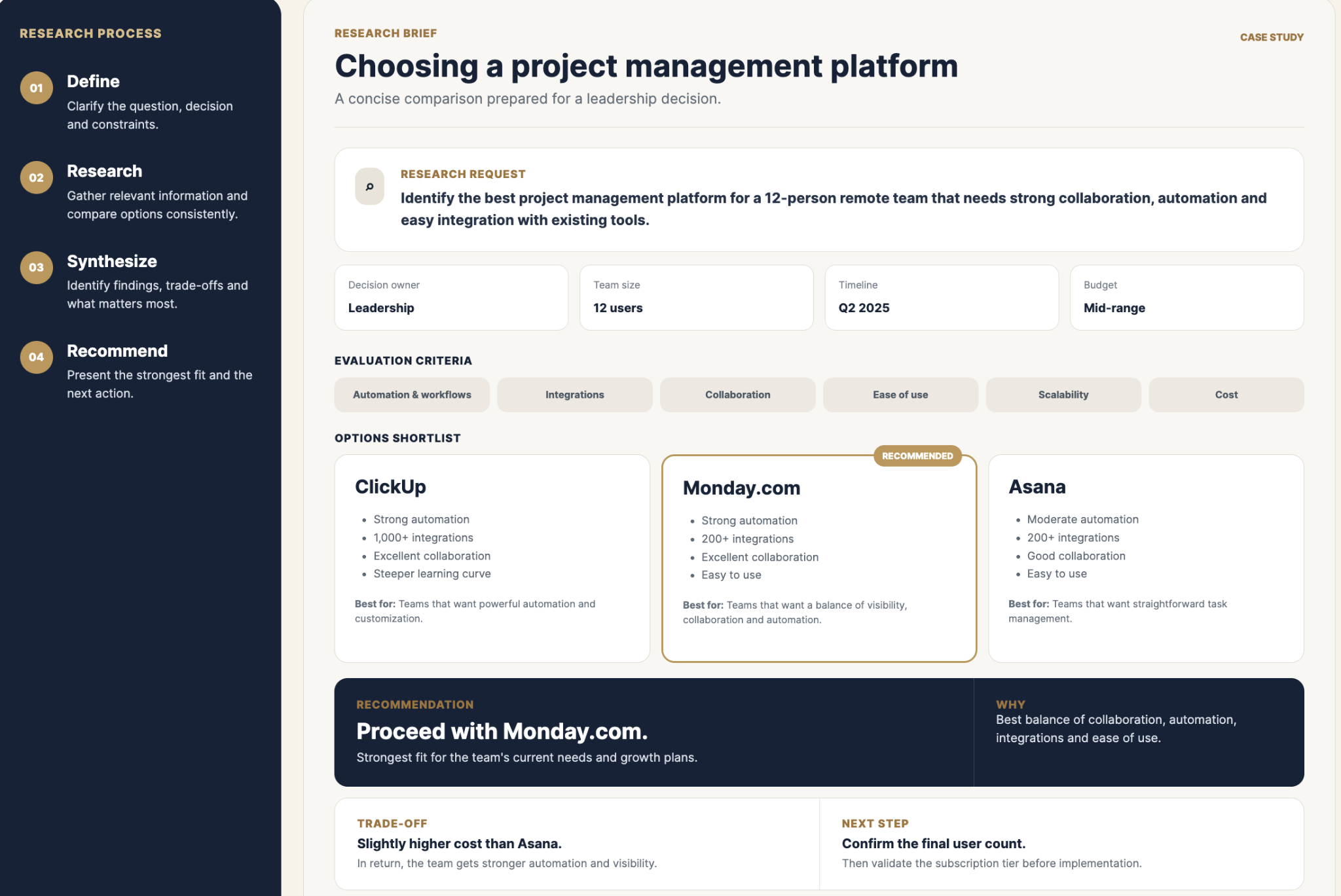
I turn research requests into concise briefs that help leaders compare options, understand trade-offs and make decisions.

RESEARCH BRIEF

Choosing a project management platform

A concise comparison prepared for a leadership decision.

CASE STUDY
RESEARCH REQUEST
Identify the best project management platform for a 12-person remote team that needs strong collaboration, automation and easy integration with existing tools.
Decision ownerLeadership
Team size12 users
TimelineQ2 2025
BudgetMid-range
EVALUATION CRITERIA
Automation & workflowsIntegrationsCollaborationEase of useScalabilityCost
OPTIONS SHORTLIST
ClickUp
  • Strong automation
  • 1,000+ integrations
  • Excellent collaboration
  • Steeper learning curve

Best for: Teams that want powerful automation and customization.

Asana
  • Moderate automation
  • 200+ integrations
  • Good collaboration
  • Easy to use

Best for: Teams that want straightforward task management.

RECOMMENDATION

Proceed with Monday.com.

Strongest fit for the team's current needs and growth plans.

WHY

Best balance of collaboration, automation, integrations and ease of use.

TRADE-OFF
Slightly higher cost than Asana.

In return, the team gets stronger automation and visibility.

NEXT STEP
Confirm the final user count.

Then validate the subscription tier before implementation.

03 • Recruitment operations

LinkedIn sourcing with a visible candidate pipeline.

A recreated operations dashboard showing how candidate sourcing, progression and follow-up can be made visible. Candidate names and data are fictional.

RECRUITMENT OPERATIONSFICTIONAL DATA
Outreach2
Alex JohnsonOperations Associate
LinkedIn

SOURCE
Bianca MillerExecutive Assistant
LinkedIn

CONTACT
Screening2
Carlos MartinezProject Coordinator
Referral

REVIEW
Diana WilsonCustomer Support
LinkedIn

SCREEN
Interview1
Ethan BrownAdmin Assistant
LinkedIn

SCHEDULE
Shortlisted1
Candidate FOperations Support
Referral

MANAGER REVIEW
Follow-up2
Candidate GExecutive Assistant
NEXT ACTION
Candidate HProject Coordinator
FOLLOW-UP
Workflow
LINKEDINSource relevant candidates.
CAPTURERecord candidate information.
SCREENReview and organize.
PIPELINETrack stage.
FOLLOW-UPKeep next action visible.
Why it matters

Recruitment becomes an operating process, not a pile of profiles.

The point is visibility: who is where, what happens next and what needs attention.

04 • Project tracking
40%
IMPROVEMENT IN ON-TIME PROJECT COMPLETION

The tracker was not the magic. Visibility was. Once work had a clear owner, deadline and status, it became easier to see what needed attention before the deadline became an emergency.

Before
After
05 • Process documentation

Process documentation people can actually use.

A recreated client onboarding SOP based on the type of process documentation I have built.

CLIENT ONBOARDINGSOP / DEMO
TRIGGERNew form submission
01Review required information
02Verify client details
03Create / confirm workflow item
04Assign process owner
05Begin onboarding
06 • Demo Lab

A portfolio-owned working demonstration.

A fictional client submits a form → the workflow routes the request → creates the task → assigns an owner → starts the process.

Try the workflow
01 • FORMApplication submitted.
02 • TRIGGERAutomation fires.
03 • ROUTECorrect workspace selected.
04 • CREATEWork item created.
05 • ASSIGNOwner attached.
06 • GENERATENext tasks created.
07 • STARTProcess begins.
Status: Waiting for submission.
07 • How I think

The operating system behind my work.

Five habits that shape how I support leaders and teams.

01 • SEE THE SYSTEM

I look beyond the immediate task and ask what process produced it.

02 • MAKE OWNERSHIP CLEAR

Good systems make it obvious who owns the next move.

03 • REDUCE MEMORY LOAD

If something must be remembered repeatedly, it probably needs a system.

04 • DOCUMENT FOR HANDOFF

A process is stronger when someone else can follow it.

05 • CLOSE THE LOOP

Completion means the outcome is confirmed, not just that a task changed status.